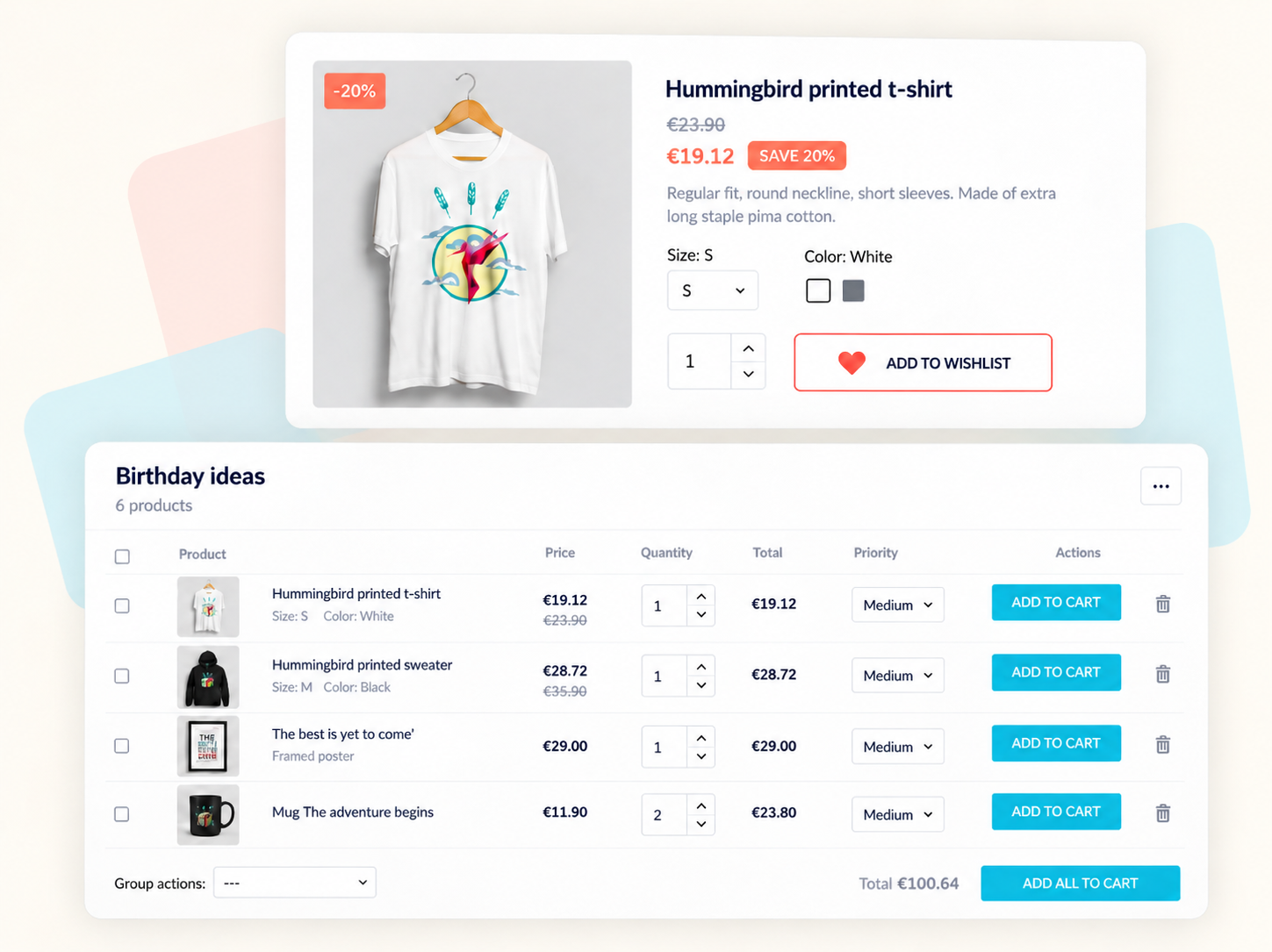
Advanced Wishlist gives PrestaShop customers a place to keep products they are not ready to buy yet. They can save exact product combinations and quantities, organize multiple lists, move cart items to Save for Later, and share a wishlist with friends or family as a gift list.
It is designed for more than adding a heart icon to a product page. A saved item should be easy to find again, a cart should not become a holding area for undecided purchases, and a shared gift list should be useful after someone starts buying from it.
Which wishlist workflow does your store need?
Different shoppers save products for different reasons. Advanced Wishlist supports these journeys without forcing everything into a single list.
| Shopping scenario | What the module lets customers do |
|---|---|
| Saving a favorite | Keep a product with its chosen combination and desired quantity |
| Planning several purchases | Create separate wishlists and assign priority to saved items |
| Deciding what to buy today | Move products from the cart to Save for Later, then return them to the cart |
| Planning birthday or wedding gifts | Share a gift list and see which items have already been purchased |
| Returning to saved products | Open wishlists from configured storefront access points |
The store can enable multiple wishlists or limit each customer to one, depending on how its customers shop.
Save products with the details that matter
A wishlist entry can retain the selected product combination, such as size or color, as well as the desired quantity. Customers do not have to reconstruct those choices when they return.
Wishlist buttons can appear on product pages and product listings. Store owners can configure their position and appearance, while customers can reach saved products from the header, navigation menu or sidebar, depending on the storefront setup.
Customers can also organize their plans with high, medium or low priority, view the value of a list, and move several saved products to the cart at once.
Keep the checkout moving with Save for Later
The shopping cart is not always a final purchase decision. A customer may be ready to order one item but still be thinking about another.
Save for Later lets them move an undecided product out of the active cart without losing it. They can complete the purchase they are ready to make and return the saved product to the cart on a later visit.
This is a different experience from removing an item and hoping to find it again. It also keeps the current checkout focused on products the customer intends to buy now.
Share wishlists as gift lists and gift registries
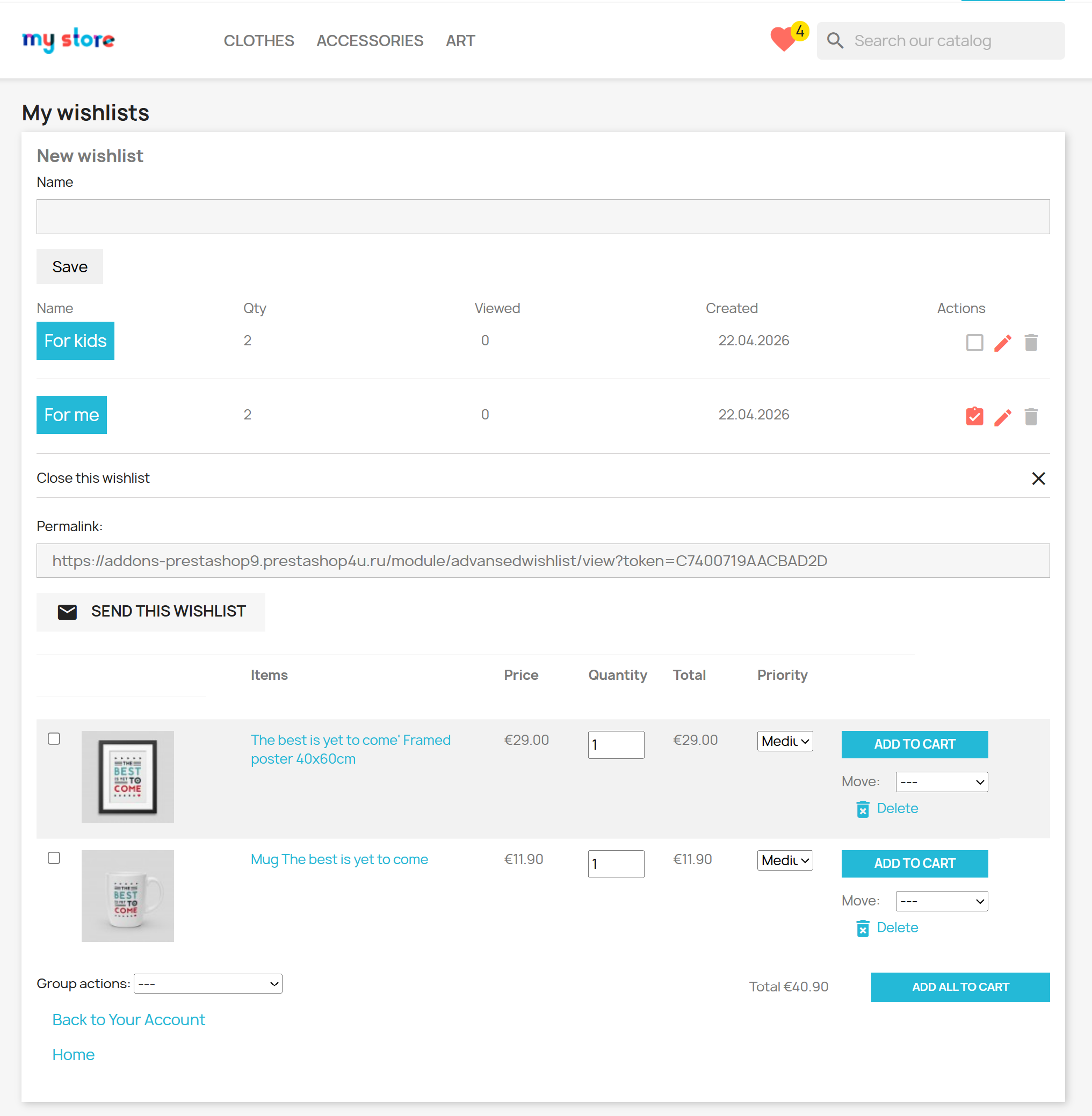
Customers can share a wishlist by email or public link for birthdays, weddings, holidays or other occasions. Friends and family can open the shared list and purchase products directly from it.
The list can include requested quantities and product priorities. Purchased items are marked on the shared wishlist, helping other visitors see what has already been bought and avoid duplicate gifts.
That last step matters: sharing a product list is only the beginning of a useful gift-list experience.
From our development work
A gift list should still work after the first present is bought
A shareable wishlist is easy to understand before anyone places an order. The more interesting question is what happens next. If several relatives open the same list, they need a way to see which gifts are already taken.
We built the gift-list workflow so friends and family can purchase from a shared wishlist and purchased products are marked on the list. Requested quantities and priorities also help make the list useful for planning, not just browsing.
It is a good example of the details we pay attention to when building PrestaShop features: the interface has to support the whole customer journey, including what happens after a purchase.
Understand what customers are saving
The back office provides access to customer wishlists and a Top 50 most wishlisted products report. This can help merchants identify products customers are considering and decide what to review for promotions or restocking.
Wishlists show interest, not guaranteed future orders. They are one more signal to consider alongside sales and inventory data.
Migration and storefront integration
Stores already using PrestaShop’s default wishlist module can import existing wishlists with the module’s one-click migration feature.
Appearance settings include the wishlist icon color and a choice of Material Icons, Font Awesome or a theme’s own icon font. The goal is to make wishlist actions fit the existing storefront rather than look like an unrelated widget.
Custom development
Need wishlists to fit your store's buying journey?
Many stores can use Advanced Wishlist with its standard configuration. If your theme or customer workflow needs something different, we can review a targeted customization:
- Theme and product-card integration. Adapt wishlist buttons, selectors and saved-item displays to a customized storefront.
- Gift-list workflows. Review requirements for gift registries, shared lists or special purchasing rules.
- Data migration. Assess migration from an existing third-party wishlist solution or a custom data format.
- Store-specific shopping flows. Connect saved products with custom cart, account or product-configuration behavior.
We will first check whether the standard module already covers your requirements. Tell us which part of the customer journey you want to change, along with your PrestaShop version and theme.
Discuss a customizationCompatibility and technical details
| Detail | Advanced Wishlist |
|---|---|
| Compatible PrestaShop versions | 1.7.8–9.2 |
| Module version | 3.2.4 |
| Multishop support | Yes |
| PrestaShop class overrides | None |
Good to know
Frequently asked questions
Can customers create multiple wishlists in PrestaShop?
Yes. Advanced Wishlist allows customers to create separate wishlists. The store owner can also configure the module to allow only one list per customer.
Does PrestaShop have a Save for Later option in the shopping cart?
Advanced Wishlist adds a Save for Later action to the cart. Customers can move undecided items out of the active cart and return them to the cart when they are ready to buy.
Can a PrestaShop wishlist be used as a gift registry?
Yes. Advanced Wishlist lets customers share a list by link or email, specify quantities and priorities, and use the shared list for gift purchases.
Does a shared gift list show which products were already purchased?
Yes. Purchased items are marked on shared gift lists, helping friends and family avoid choosing the same gift twice.
Can a wishlist remember the selected size, color and quantity?
Yes. Advanced Wishlist saves the chosen product combination and desired quantity with the wishlist item.
Can I import wishlists from the default PrestaShop wishlist module?
Yes. Advanced Wishlist includes a one-click import from PrestaShop's default wishlist module. For other wishlist systems, the migration requirements need to be assessed separately.
Can merchants see their most wishlisted products?
Yes. The back office includes customer wishlist information and a Top 50 most wishlisted products report.
Which PrestaShop versions does Advanced Wishlist support?
The Addons information shown for module version 3.2.4 lists PrestaShop 1.7.8–9.2, multishop support and no class overrides. Check the latest Addons listing for subsequent releases and PHP requirements.